> ## Documentation Index
> Fetch the complete documentation index at: https://docs.apostra.com/llms.txt
> Use this file to discover all available pages before exploring further.
# Diagnose third-party sales agents
> Check whether an external AdCP inventory source is reachable, healthy, and responding to buyer requests
When your storefront uses a third-party AdCP-compatible sales agent as an
inventory source, Apostra can help you answer two different questions:
* **Is the source set up correctly?** Check source status, credentials,
advertised capabilities, and compliance.
* **What happened on recent buyer traffic?** Inspect recent AdCP calls,
responses, task statuses, and failures for that source.
Use both. A source can be configured correctly but still fail a specific buyer
request, and a failed buyer request can come from a valid business rejection
rather than a broken connection.
Setup, request eligibility, and health are separate. Apostra sends a
discovery request when the Source is set up, not paused, mapped to an eligible
Agent, and compatible with that request. Degraded or erroring health remains
visible but does not automatically stop requests. A serious health problem may
lead an operator to record a separate, reasoned ineligibility decision.
### A timeout is not an error response
A typed `timeout` means the call did not finish inside the observer's budget.
It does not mean the Source returned an error, is unreachable, or is currently
unhealthy. For example, a `get_products` call can exceed a 30-second buyer
window and then complete successfully in 35.7 seconds when observed with a
longer 45- or 60-second budget. A fresh test with the same 30-second budget may
simply reproduce that budget mismatch; compare it with a 60-second observation
before diagnosing reachability.
The response exposes the mechanism as `condition: "timeout"`, separately from
the diagnostic impact (`status: "degraded"`). A completed error response uses
`condition: "error_response"`; a connection failure uses
`condition: "transport_error"`. Reporting has its own health axis, so an
inventory observation timeout does not make healthy reporting unhealthy.
None of these health observations changes request eligibility by itself.
Human-facing Source Health surfaces use one vocabulary: **Healthy**,
**Degraded**, **Erroring**, and **Unknown**. The detailed diagnostics API keeps
the older `unhealthy` value in `source.health.status` and capability
observations for wire compatibility; clients should present that value as
**Erroring**. Do not infer the failure mechanism from that status. Read
`condition`: `timeout` is observer-budget exhaustion and is degraded evidence,
while `error_response` means the Source actually returned an error.
Diagnostics keep three evidence types separate:
* A **source test** is an explicit sandbox test against the selected source.
* A **source call** is an observed protocol exchange with the selected source,
such as `get_capabilities` or an Agent-supplied `get_products` request.
* A **storefront buyer-path or composition run** describes work at the
storefront layer. It is not evidence that the selected source was called
unless a source exchange is attached to it.
### Physical transport evidence
`transportRequests` is the bounded, redacted record of outbound protocol
attempts. It is separate from logical `recentActivity` and the health verdict:
one logical operation can create several physical requests.
For media-buy creates and updates, `groupId` identifies the application
operation and each SDK session keeps its own `debugId`. Local stages show setup
and whether mutation dispatch was attempted. `physicalRequestCount` excludes
local stages; `logicalOperationCount` counts accepted operation envelopes.
If `mutation_not_dispatched` is present, Apostra stopped locally and no
remote mutation request or response was recorded. This does not establish that
the remote media buy is unchanged. An authoritative readback is required.
This distinction matters for `no_ingredients`: a composition run can stop at
the storefront before it calls the external sales agent. That failure must not
be shown as a failed source call or source test. On the Agent-supplied product path,
the storefront sends the brief to the external agent's `get_products`; that
call uses the agent's finished products and does not require ingredients.
## Read seller readiness without combining unrelated results
For a source linked to an Agent, Source Diagnostics shows three separate
results:
* **Marketplace availability** says whether the storefront can currently
transact. Resolve any listed blocker in Seller Setup.
* **Agent certification** applies to the Agent's current revision. If it needs
attention, open the Agent page and complete its certification work. A stale
certification does not by itself change the marketplace result shown here.
* **Source health** is the latest observed condition for this exact source.
When it is degraded, erroring, or unknown, open **Setup** and refresh
capabilities before changing the source. That refresh checks the endpoint,
credentials, and declarations; it does not prove product discovery or a
media-buy lifecycle.
Use validation when you need new no-spend evidence for the exact source. A
successful source check is not a replacement for the storefront's own
availability decision or for current Agent certification.
If the source has no organization-owned Sales Agent, Source Diagnostics offers
the Create Agent Task for a self-operated replacement and an Apostra support
route for a Partner connection. A revoked Partner mapping cannot be restored
from this page: Apostra coordinates that cross-organization connection.
For external sales-agent sources, also separate **live source health** from
**component-cache health**. Live health answers whether Agent-supplied discovery or
media-buy calls reached the source and completed. Component-cache health answers
whether Apostra can read the source's raw products/components for
merchandising without calling the source during buyer-request composition. Cache
complaints usually mean the source does not support a usable component response,
returned invalid/missing product metadata, has an errored or cold cache state, or
cannot refresh because of auth or reachability. Stale-but-usable cached rows are
not automatically a failure; they are valid composition inputs when the
storefront allows hard-stale OK cache reads. Soft-refresh age is handled
automatically by Apostra's stale-while-revalidate cache path; it does not
create a seller action item. A cache complaint does not by itself mean live
the Agent-supplied product path is down.
Apostra does not make wholesale product or signal catalog requests to every
external sales agent. They run only when the Source's explicit product contract
includes the Storefront-built path and the Agent reports AdCP 3.1+ support. An
Agent-supplied Source focuses on live buyer-request activity instead of component-cache
readiness. Only wholesale products are composition inputs; ordinary finished
products are not reclassified as ingredients. Managed ad-server Sources have a
fixed wholesale contract because their raw inventory must be turned into
products. Neither product path is separately monetized.
When a seller-operated source stays unhealthy long enough to trigger a proactive
Murph alert, the alert links directly to this diagnostics surface with the
affected source selected. Open that link first, then use the recent activity and
developer handoff sections for the partner-safe debug ID, task ID, operation ID,
and correlation headers behind the failing calls.
## Endpoint
`GET /api/v2/storefront/inventory-sources/{sourceId}/diagnostics`
Returns seller-facing diagnostics for one third-party sales-agent or modular
inventory source. The response combines the current source setup, recent AdCP
activity, test-run evidence, latency rollups, error rates, discovery
participation, demand impact, and developer handoff identifiers. New outbound
calls include a partner-safe `x-scope3-debug-id` that also appears in the
diagnostics handoff.
### Canonical reporting evidence
The response's `reporting` field is an independent projection of the canonical
reporting ledger for this exact Source. It does not derive reporting health
from generic Source activity or copy one Source's result onto its Agent.
* `availability` says whether canonical reporting evidence is supported or
unsupported. It is `null` when no value was observed.
* `health` uses `waiting`, `healthy`, `delayed`, `action_required`, and
`complete`.
* `sourceProvenance: acquired` appears only when an immutable acquisition plan
proves the Source attribution. `null` means that proof was not observed, not
that the Agent lacks reporting capability.
* `obligations` preserves period, expected time, required finality, coverage,
missing-first-report state, issue ownership, and latest revision evidence.
* `lastSuccessfulRevision`, `dataThrough`, `nextExpectedAt`, and `freshness`
describe the most recent usable reporting state.
* Truncation flags mark bounded obligation and related-media-buy collections.
A response that exceeds the obligation-row limit returns nullable aggregate
reporting state instead of projecting health from partial evidence.
A reporting-ledger read failure does not erase otherwise-valid Source
diagnostics or change inventory health. In that case reporting returns a
nullable projection. The action descriptors are read-only integration
seams and remain unavailable with `reason: adapter_pending` until their typed
adapters are connected.
### Local synthetic Demo evidence
A code-owned `demo-*` source under the authenticated Storefront's active,
unexpired Demo lease uses local synthetic verification. Its persisted recipe
is the source evidence, so Seller Setup reports all nine required source steps
ready and Source Diagnostics labels it **Local synthetic**. No vendor endpoint,
credentials, protocol trace, capability refresh, or live source test exists for
this path.
This classification is read-only. It does not create, extend, or reactivate a
Demo lease, change capabilities, or publish synthetic inventory. A missing or
expired lease, a different tenant, or a source without a `demo-*` recipe uses
the ordinary live-source verification model.
To run a direct source test, use the shared storefront operation
`run_inventory_source_discovery_test`, backed by:
`POST /api/v2/storefront/inventory-sources/{sourceId}/tests/discovery`
This source-scoped operation calls the selected external sales agent's
`get_products` with a read-only brief. It creates no media buy, spends nothing,
and does not test reporting or webhooks. Its outcome, product count, step, and
available debug identifiers are recorded as a durable source test run, so the
result remains available from `list_agent_test_runs` and in Source Diagnostics.
### Refresh current health evidence
If Source Diagnostics shows stale or conflicting health evidence, ask Murph to
refresh the affected inventory source, or call
`refresh_inventory_source_health` from an MCP client with that source's
`sourceId`. No refresh is needed when diagnostics does not request verification.
The operation sends one no-spend `get_products` request to that source. It does
not change source configuration, create a media buy, or test reporting or
webhooks. Its response returns the timestamped outcome, recorded run, task,
operation, debug, and correlation IDs, and refreshed storefront readiness. The
same evidence appears in Source Diagnostics.
MCP hosts open the same Source Diagnostics app through the typed
`open_source_diagnostics` tool. The widget and its actions use shared MCP
contracts rather than sending a new chat message to Murph.
### Run the full Sales Agent validation
For a third-party Sales Agent Source, **Test & certify** runs the current
`test-sales-agent` skill. A separate Buyer Account is optional: when you
do not select one, Apostra creates the validation Advertiser and draft
Campaign inside the Media Company account's isolated seller sandbox. If you do
select a reachable Buyer Account, validation continues to use that account.
Choosing **No auth** completes credential setup for a public endpoint; there is
no secret to submit. Murph inspects the saved Source and continues to
diagnostics instead of reopening the credential form. A validation window with
no qualifying calls remains **untested**, not failed.
## Request
```bash curl theme={null}
curl "https://api.apostra.com/api/v2/storefront/inventory-sources/retail-adcp/diagnostics?windowHours=24" \
-H "Authorization: Bearer $SCOPE3_API_KEY"
```
```bash Run discovery test theme={null}
curl -X POST "https://api.apostra.com/api/v2/storefront/inventory-sources/retail-adcp/tests/discovery" \
-H "Authorization: Bearer $SCOPE3_API_KEY" \
-H "Content-Type: application/json" \
-d '{"brief":"Return representative products available to a US buyer."}'
```
## Parameters
| Field | Type | Required | Notes |
| ------------- | --------------- | -------- | ------------------------------------------------------------------------------------------------------------------------ |
| `sourceId` | string (path) | Yes | Storefront-scoped inventory source ID. |
| `windowHours` | integer (query) | No | Lookback window for activity and test-run rollups. Defaults to the service window, minimum `1`, maximum `720` (30 days). |
## Response
```json theme={null}
{
"source": {
"id": "42",
"sourceId": "retail-adcp",
"name": "Retail AdCP Agent",
"executionType": "AGENT",
"status": "ACTIVE",
"agentId": "agent_retail",
"endpointUrl": "https://sales-agent.example.com/mcp",
"protocol": "MCP",
"auth": {
"type": "bearer",
"required": true,
"configured": true
},
"capabilities": {
"tools": ["get_products", "create_media_buy"],
"products": "supported",
"createMediaBuy": "supported",
"updateMediaBuy": "unknown",
"signals": "unsupported"
},
"productMode": {
"agentCapabilityUid": "4eb9d7be-e005-42af-9d26-56c119671aad",
"declaredAgentMode": "BOTH",
"bindingSelection": "BOTH",
"effectiveMode": "BOTH",
"reasons": [],
"paths": [
{ "path": "WHOLESALE", "ready": true, "reasons": [] },
{ "path": "COMPOSING", "ready": true, "reasons": [] }
]
},
"health": {
"status": "healthy",
"lastError": null,
"lastErrorCode": null,
"lastErrorAt": null,
"lastSuccessAt": "2026-06-18T12:45:00.000Z",
"lastCheckedAt": "2026-06-18T12:50:00.000Z"
},
"capabilityHealth": {
"inventory": {
"status": "healthy",
"observations": [
{
"observer": "get_products",
"status": "healthy",
"previousStatus": "degraded",
"condition": null,
"cause": null,
"detail": null,
"owner": "seller",
"observedAt": "2026-06-18T12:45:00.000Z",
"lastOkAt": "2026-06-18T12:45:00.000Z"
}
]
},
"reporting": {
"status": null,
"observations": []
}
}
},
"window": {
"hours": 24,
"startedAt": "2026-06-17T13:00:00Z",
"endedAt": "2026-06-18T13:00:00Z",
"sampledActivityCount": 37,
"activityTruncated": false,
"sampledTestRunCount": 4
},
"performance": {
"requestCount": 18,
"responseCount": 18,
"exchangeCount": 18,
"completedCount": 15,
"failedCount": 1,
"inputRequiredCount": 1,
"pendingCount": 1,
"rejectedCount": 0,
"timeoutCount": 0,
"timeoutRate": 0,
"errorRate": 0.06,
"inputRequiredRate": 0.06,
"completedRate": 0.83,
"latencyStatus": "within_threshold",
"latencyThresholdMs": 30000,
"overThresholdCount": 0,
"staleAsyncResponseCount": 0,
"p50LatencyMs": 1200,
"p95LatencyMs": 4200,
"p99LatencyMs": 4200,
"unknownLatencyCount": 0
},
"comparison": {
"previousWindow": {
"startedAt": "2026-06-16T13:00:00Z",
"endedAt": "2026-06-17T13:00:00Z",
"exchangeCount": 14,
"issueCount": 0,
"timeoutCount": 0,
"errorRate": 0,
"p95LatencyMs": 3100,
"sampledActivityCount": 28,
"activityTruncated": false
},
"issueDelta": 2,
"timeoutDelta": 0,
"errorRateDelta": 0.06,
"p95LatencyDeltaMs": 1100,
"trend": "new_issue",
"summary": "New issue pattern in this window: 2 more affected requests."
},
"toolBreakdown": [
{
"tool": "get_products",
"exchangeCount": 12,
"completedCount": 11,
"failedCount": 1,
"inputRequiredCount": 0,
"rejectedCount": 0,
"timeoutCount": 0,
"p95LatencyMs": 3600
}
],
"discoveryParticipation": {
"calledCount": 12,
"skippedCount": 0,
"excludedCount": 0,
"timedOutCount": 0,
"skipReasons": []
},
"outcomeMix": {
"returnedProductsCount": 10,
"returnedNoProductsCount": 1,
"failedCount": 1,
"businessRejectedCount": 0,
"pendingCount": 1,
"inputRequiredCount": 1,
"timedOutCount": 0,
"skippedCount": 0
},
"demandImpact": {
"buyerRequestsAffected": 2,
"missedProductOpportunityCount": null,
"notes": [
"Affected request count includes failed, timed-out, rejected, input-required, and skipped diagnostic attempts in this window.",
"Missed product opportunity count is not estimated until buyer-side debug demand captures expected product counts."
]
},
"recentActivity": [
{
"id": 98765,
"timestamp": "2026-06-18T12:45:00Z",
"tool": "get_products",
"taskStatus": "COMPLETED",
"activityType": "response",
"taskId": "task_123",
"operationId": "op_456",
"contextId": "ctx_789",
"idempotencyKey": "idem_abc",
"correlationId": "trace_def",
"initiatorEmail": "s***@example.com",
"origin": {
"kind": "live_demand",
"testRunUid": null,
"testRunStatus": null,
"testRunToolName": null,
"testRunCreatedAt": null
},
"isIssue": false,
"summary": "Returned 5 products."
}
],
"diagnosis": {
"severity": "ok",
"owner": "seller",
"topCause": "Source is responding within threshold.",
"issues": [],
"nextSteps": ["Continue monitoring failed calls and webhook completion."],
"developerHandoff": {
"sourceId": "retail-adcp",
"sourceName": "Retail AdCP Agent",
"agentId": "agent_retail",
"endpointUrl": "https://sales-agent.example.com/mcp",
"latestTaskId": "task_123",
"latestOperationId": "op_456",
"latestContextId": "ctx_789",
"latestIdempotencyKey": "idem_abc",
"latestCorrelationId": "trace_def",
"correlationHeaders": {
"x-scope3-trace-id": "trace_def"
},
"latestError": null
}
},
"docs": [
{
"label": "Inventory sources",
"url": "https://docs.apostra.com/v2/storefront/inventory-sources/overview"
}
]
}
```
The most important response blocks are:
| Field | What it tells you |
| ------------------------ | ---------------------------------------------------------------------------------------------------------------------------------------------------------------------------------------------------------------------------------------------------------------------------------------------------------------------------------------------------- |
| `source` | Current setup state: source identity, status, endpoint, auth, advertised capabilities, latest collapsed health, and the fuller `capabilityHealth` picture: each axis's derived `status` alongside the per-observer `observations[]` behind it ([below](#capability-health-observations)). |
| `window` | The lookback period and how much activity/test-run evidence was sampled. `activityTruncated: true` means the 200-row sample cap was reached; `recentActivity[]` shows only the most recent 200 rows, so counts and rates reflect the sample rather than the full window. |
| `performance` | Sampled `get_products` request/response counts, completion/failure/input-required rates, timeout rate, latency percentiles, and whether latency exceeded the configured threshold. |
| `comparison` | Current lookback window compared with the immediately preceding equal-length window. Trends are `new_issue`, `worse`, `improved`, `recovered`, `unchanged`, or `not_enough_data`; they describe observed source activity only. Previous-window `sampledActivityCount` and `activityTruncated` use the same 200-row sample cap as the current window. |
| `toolBreakdown[]` | Per-tool outcomes across sampled source-diagnostic exchanges. The current seller-facing diagnostic window analyzes `get_products`; use `externalCallLanes[]` for other observed outbound operations. |
| `externalCallLanes[]` | Prometheus-backed outbound-call rollups for this exact inventory source. Each lane reports call count, outcomes, and p95 latency without exposing other sources or provider targets. A newly deployed source label can have no observations yet. |
| `discoveryParticipation` | Observed `get_products` exchanges with this source, plus source-scoped diagnostic skips and timeouts. This is source-call evidence, not the buyer-side storefront candidate set. |
| `outcomeMix` | Whether calls returned products, returned no products, failed, timed out, waited for input, or were business-rejected. |
| `demandImpact` | Affected request count plus notes. Missed product opportunity count is currently `null` until buyer-side debug demand captures expected product counts. |
| `recentActivity[]` | Most recent `get_products` calls, responses, task statuses, errors, trace/correlation identifiers, initiator email, sandbox-test/live-demand origin, and summaries. |
| `diagnosis` | Severity, **owner**, top cause, structured `issues[]` breakdown, next steps, and developer handoff details to share with the source operator. |
`diagnosis.owner` tells you who must act:
* `seller` — a generic external sales agent you operate, or an adapter whose
credentials need re-authorizing. The `topCause` and `nextSteps` are addressed
to you.
* `scope3` — an official Apostra-hosted adapter (Pinterest, Reddit, Snap, …)
whose runtime is failing. Apostra operates that runtime; the failure is ours to
fix and recovers automatically, so there is nothing for you to do. `nextSteps`
will say so rather than asking you to debug our infrastructure.
`diagnosis.topCause` is the primary explanation to show first. Use
`diagnosis.issues[]` when more than one signal is present in the same window:
for example stale async callbacks, caller-deadline timeouts, slow responses,
non-timeout failures, input-required responses, business rejections, skipped
diagnostic attempts, missing auth, or inactive sources. Each issue includes a
stable `mode`, `severity`, affected `count`, and human-readable `summary`.
Issue `mode` values use the same source failure vocabulary as the diagnosis
model, such as `stale_async`, `timeout_degraded`, `auth_missing`,
`source_runtime_error`, `business_rejected`, and `input_required`.
`comparison.trend` is a quick movement signal, not an uptime or SLA claim. It
compares sampled source activity in the requested window with the immediately
previous window of the same length. `not_enough_data` means neither window has
enough source activity to compare; latency remains unknown when request and
response rows cannot be paired.
Zero calls in the selected window means the operations are **untested in that
window**. It is not a failed call and cannot, by itself, support an Erroring
verdict. Likewise, missing validation assertions mean no qualifying run has
assessed them yet; read the captured health observation or failed exchange
before attributing a failure to the Source.
The latest source-health check can be older than the selected activity window.
When an older failed check has no newer traffic to confirm or clear it, the
overview labels it as stale evidence and asks for current verification. It does
not claim the source is currently down, and it does not say that no action is
needed. A healthy completed `get_products` result takes precedence over an
unhealthy `sync_creatives` observation only when it is at least 24 hours newer
and both observations remain inside the seven-day freshness window. Other
current unhealthy observations stay visible and can still affect readiness.
### Capability health observations
`source.health` is one collapsed cell for the inventory axis: the same
worst-of-fresh collapse described below for `capabilityHealth.inventory`, not
whichever check happened to write last. Its own `status` field is `healthy`,
`degraded`, `unhealthy`, or `unknown` (`unknown` when nothing has ever
reported) — a survivor of the per-source column this field has always read,
kept as its own four-value field for compatibility.
Present `unhealthy` as **Erroring** in human-facing output.
Two of its other fields follow the same "worst check wins, not last check
wins" rule, which matters when more than one check is reporting on the same
source:
* `lastSuccessAt` is the last time the *currently worst-reporting* check saw a
healthy result, not the most recent success across every check. If that
worst-reporting check has never once succeeded, `lastSuccessAt` reads
`null` even though a different, healthy check has a success history.
* `lastErrorAt` clears back to `null` as soon as the collapsed `status` is
`healthy`, rather than continuing to show a past error that no longer
reflects current state.
`source.capabilityHealth` is the fuller picture behind that cell, and it uses
a different convention for "nothing has reported": `null` instead of the
string `unknown`. It has two axes, `inventory` and `reporting`, and each axis
carries both a derived `status` and the `observations[]` evidence behind it:
| Field | What it tells you |
| ---------------- | ----------------------------------------------------------------------------------------------------------------------------------------------------------------------------------------------------------------------------------------------------------------------------------------------------------------------------------------------------------------------------------------------------------------------------------------- |
| `status` | The current verdict for this axis, derived server-side from every check that has reported on it: `healthy`, `degraded`, or `unhealthy`, or `null`. It discounts a check that has gone stale (stopped reporting recently) in favor of fresher evidence, and reads `null` when nothing has ever reported. A surface that needs one value for this axis reads `status` directly rather than deriving its own collapse from `observations[]`. |
| `observations[]` | One entry per check that has reported on this axis, newest first: the evidence behind `status`. |
Each entry in `observations[]` has:
| Field | What it tells you |
| ---------------- | ----------------------------------------------------------------------------------------------------------------------------------------------------------------------------- |
| `observer` | The name of the check that produced this reading, for example `get_products`. |
| `status` | `healthy`, `degraded`, or `unhealthy`. Always one of these three; an entry never reports `unknown` or a null status — a check with nothing usable to say simply has no entry. |
| `previousStatus` | What this same check reported last time, or `null` on its first reading. |
| `cause` | Machine-readable failure code, or `null`. |
| `detail` | Human-readable description of the reading, or `null`. |
| `owner` | Who can act on a failing reading: the same `seller` / `scope3` distinction as `diagnosis.owner` above. |
| `observedAt` | When this check produced the reading (ISO-8601). Can be `""` for a persisted reading whose timestamp failed to parse; treat that as unknown, not as "now". |
| `lastOkAt` | The last time this check saw a healthy result, or `null` if it never has. |
Three things follow from that shape:
* **Different checks watch the same source and can disagree.** A source can
have one check confirming `get_products` connectivity while a separate
reporting check is failing, and both readings stay visible in
`observations[]` at once: for example, one check reporting the connection is
fine while another reports the reporting feed failing. The old single cell
was last-writer-wins: whichever check happened to run most recently silently
overwrote whatever the others had reported, and the disagreement was lost.
`status` restores that visibility without giving up a single verdict: it is
computed across every reporting check, not just whichever wrote last.
* **An empty `observations` array means no check has reported on that axis
yet, and `status` reads `null` accordingly.** A source with no reporting
checks configured shows `"reporting": { "status": null, "observations": [] }`; read that as "not observed," not as "reporting is fine."
* **A reading can go stale, and `status` already accounts for that.** A check
that stopped running leaves its last reading in place indefinitely;
`status` discounts a reading old enough to no longer describe current state
in favor of fresher evidence on the same axis. The same rule this page
already applies to `source.health` applies here: a failure with no newer
activity to confirm or clear it is stale evidence that needs current
verification, not a confirmed current outage.
* **Each axis's `observations[]` array is capped at 20 readings, newest
first.** A source realistically reports through a handful of named checks
per axis, so this is not a limit you should expect to hit in practice.
## Errors
* `400 BAD_REQUEST` — `windowHours` is not a positive integer or is greater than `720`.
* `401 UNAUTHORIZED` — missing or invalid API key.
* `404 NOT_FOUND` — no inventory source with this `sourceId` exists for the storefront.
See [Errors](/v2/reference/errors) for the full error contract.
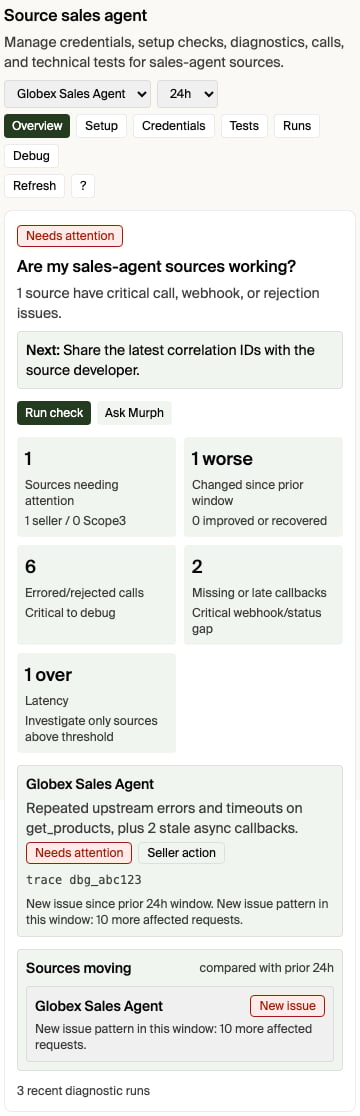
## Open the diagnostics surface
Diagnostics open from the source you are looking at, scoped to that source:
* **From the source itself.** In the ad-server or sales-agent source app in
chat, use **Open full diagnostics**. It opens the Source Diagnostics app
already focused on the connection you had selected. (The in-app **View
details** / **View diagnostics** buttons are different — they switch to the
advanced tab inside the same source app.)
* **From Pending operations.** When a source you operate degrades, it appears
in the **Sources degraded** group of the Pending operations view with its
severity and a one-line summary. Each row's **Open full diagnostics** opens
the Source Diagnostics app scoped to that source.
* **By asking Murph.** Ask "why is `` failing?" or "show me diagnostics
for ``" — Murph opens the Source Diagnostics app scoped to that
source. Naming the source focuses the app on it; otherwise it opens on the
source you last had selected.
* **From the Help menu.** Open **Ask Murph**, choose **Help**, then choose
**Diagnostics** for the storefront-wide diagnostics view (change history,
Calls, source tools, test runs).
Choose **Show me** from a Source Diagnostics announcement, or choose **?** in
the diagnostics surface, to start the two-minute quick tour. The tour teaches
the same operating sequence in every supported chat host:
1. Start with the question: is this source healthy, what changed, and who acts?
2. Choose the evidence window. Start with 24 hours, narrow for an active
incident, or widen it to confirm a pattern.
3. Read the overview verdict before inspecting individual calls.
4. Use **Evidence** for recent calls and partner-safe handoff identifiers.
5. Take the smallest diagnosed next action, then refresh or run a focused test.
The surface has three primary views: **Summary**, **Evidence**, and **Setup**.
**Run discovery test** calls the selected external source's `get_products`
directly with a read-only, no-spend brief and records the result as a durable
source test run. It does not create a media buy. **Refresh capabilities** is the
secondary setup check: it calls the source capability endpoint directly and
shows the result in the app; it does not send a synthetic question to Murph.
Capability refresh verifies endpoint reachability, credentials, and declared
tools only—it does not prove discovery. The refresh is scoped to the selected
Source's own connection identity, so it works even when that Source has no
legacy standalone Agent record.
A buyer-path result appears under the selected source only when diagnostics have
an observed source exchange to attribute to it. A storefront intelligence run
that stopped before source dispatch remains storefront evidence, not a failed
call against the external agent.
In **Setup**, diagnostics show the selected Source's provider-declared mode,
effective product path, and readiness. That authority is read-only in
Apostra. To remediate an incomplete wholesale path, correct the Agent's
reported product, property, format, pricing, or execution declaration, then ask
Apostra support to refresh or reconcile the capability. Do not change a mode to
hide a readiness failure.
For an Agent-supplied source, **Connected** means its source connection and required
credentials are ready. Setup does not wait for an Apostra wholesale catalog,
and a `null` reporting `status` (no reporting check has reported yet) does
not become setup work. A subsequently observed degraded or unhealthy source is
shown as **Needs attention** instead.
### Powered by
When the selected Source is backed by a Sales Agent, Setup shows a **Powered
by** card naming that Agent and linking to its Agent Page. The card's heading
reflects who holds the Agent, not just that one exists:
| Heading | When it shows | Meaning |
| ------------------------------------------------------------------------------ | ------------------------------------------------- | ----------------------------------------------------------------------------------------------------------------------------------------------------------------------------------------------------- |
| **Your Agent** | The Sales Agent belongs to your own organization. | You own and operate this Agent; the card links to your full Agent Page. |
| **Powered by Agent**, with the Agent's name and "Operated by *operator*" below | The Sales Agent belongs to another organization. | You are using someone else's Agent as this Source's supply; the card links to the client-safe **Powered by** projection of that Agent's Page — no writes, only the facts relevant to your connection. |
| **This source isn't linked to an agent yet.** | The Source has no explicit Agent binding yet. | Apostra never guesses a binding from URL matching — connect the Source to an Agent to populate this card. |
| **Agent link revoked** | The Source's Agent binding was revoked. | The prior connection no longer applies; reconnect the Source to a current Agent to restore Agent-backed diagnostics. |
See [Agents](/v2/concepts/agents#see-which-agent-powers-a-source) for the
underlying `powered-by-agent` endpoint and its `ACTIVE` / `UNMAPPED` / `REVOKED`
states.
The tour changes tabs and highlights controls, but it does not change source
configuration. Any product action keeps its normal safeguards.
You can also open Source Diagnostics directly by replacing `` with
your account id:
```text theme={null}
https://app.apostra.com//murph?view=chat&askMurph=open_feature&feature=source-health
```
To focus the app on one inventory source, include `diagnosticsSourceId`:
```text theme={null}
https://app.apostra.com//murph?view=chat&askMurph=open_feature&feature=source-health&diagnosticsSourceId=
```
Task-level filtering is available inside the app's recent-call search after it
loads; there is not currently a task-id deep link.
Slack cannot render the MCP app inline. When Murph diagnoses a sales-agent
source from Slack, it provides this same account- and source-scoped link as a
**Open sales-agent diagnostics** button. Open it, choose **Run discovery test**,
then reply **done** in the Slack thread. Murph looks up the recorded source test
and interprets it; you do not need to copy the result between apps.
## Start with the inventory source
Open the storefront inventory source in the app, or call
[Get storefront readiness](/v2/storefront/tasks/get-readiness). The
`sourceDiagnostics[]` entry for each source gives the current operating picture:
| Field | What it tells you |
| ------------------ | ---------------------------------------------------------------------------------------------------------------------------------------------------------------------------------------------------------------------------------------------- |
| `sourceStatus` | Whether the source is active, pending, or disabled. |
| `auth` | Whether the source requires credentials and whether they are configured. |
| `capabilities` | Whether the source advertises support for product discovery, media-buy creation, updates, signals, and wholesale products. |
| `productMode` | The Agent declaration, Source selection, effective product mode, bounded reconciliation reasons, and readiness for each Storefront-built or Agent-supplied `path`. `WHOLESALE` means Storefront-built; `COMPOSING` means Agent-supplied. |
| `productBuilder` | Legacy compatibility projection of `composition`, `passthrough`, or `unknown`. Use the Source product-path fields for authority. Component-cache readiness applies only to the Storefront-built path when the Agent reports AdCP 3.1+ support. |
| `compliance` | Latest AAO / AdCP compliance result for the source. |
| `debug` | Sanitized advertised tools, channels, publisher domains, protocol version, billing support, and related capability metadata. |
| `health` | Current source health, including latest error, latest success, and latest check timestamps when available. |
| `capabilityHealth` | Derived `status` plus per-observer `observations[]` for the `inventory` and `reporting` axes, same shape as [Capability health observations](#capability-health-observations) above. |
If the source is not active, credentials are missing, or the source does not
advertise the tool you need, fix that before debugging individual buyer
requests.
Treat a failed capability refresh and failed source traffic as separate
signals. A refresh can fail while a recent `get_products` call succeeds, and
that successful call is direct evidence that the source responded. Planning
can continue from a clearly labeled last-known capability document; when no
capability document is available, it reports the probe failure separately
instead of treating missing metadata as proof that the source is unreachable.
### Understand product paths
The `productMode.paths[]` diagnostics report each Source's effective runtime
path and its readiness. **Storefront-built** means Apostra can use ready
wholesale inputs from the Source when composing products. **Agent-supplied**
means the connected Agent returns complete buyer-ready products. An Agent that
supports both reports each path independently; a problem on one path does not
silently reclassify the other.
Use the Source's normal detail page for connection and operating actions, and
use `productMode` diagnostics to identify whether the Source, Apostra, or the
connected Agent owns a readiness problem.
Storefront readiness also includes **Interpretable product formats** when
canonical-format compliance is enabled for your storefront. Direct canonical
`format_options[]` and projectable legacy `{agent_url, id}` references both
pass, regardless of source age. If a legacy product contains several format
references, at least one usable canonical projection keeps the product
available; an unsupported sibling reference is omitted from the buyer-facing
format options and remains visible as an advisory diagnostic. A product with no
usable canonical option is withheld on its own, while the Source and its other
products remain request-eligible.
Seller Setup prefers public catalog evidence when a source has it, so an older
buyer-account or sandbox-test observation does not override a corrected public
declaration. Buyer discovery and purchase still validate the relevant account
context before products can serve. The readiness check names unresolved
products and their affected Source as repair guidance; it does not make the
storefront transaction-ineligible. Replace an unsupported custom reference
with an exact shared-catalog reference or publish an interpretable custom
canonical declaration. The Source's separate connectivity health can remain
healthy because a successful response with a partial catalog warning is not a
reachability failure.
This compatibility policy is distinct from observed Source health. A health
error does not automatically make the Source ineligible or suppress its next
request; stopping traffic requires a separate explicit Source or Agent control.
See [Connect your sales agent](/v2/storefront/inventory-sources/connect-your-agent#product-format-compliance)
for the product-format policy.
## Inspect recent AdCP activity
For source-specific traffic, use **Ask Murph > Help > Diagnostics > Debug
calls** and ask about the inventory source by name. Murph can inspect recent
third-party sales-agent activity for the caller's storefront: requests,
responses, webhook/status changes, task IDs, task statuses, and sanitized
payloads. You can ask for a specific time range ("last 2 hours" or an ISO
start/end window) or provide a debug/correlation ID from `x-scope3-debug-id`,
`traceparent`, `x-request-id`, operation ID, task ID, context ID, or idempotency
key.
The diagnostics surface also exposes a bounded, redacted details panel for
recent calls. Use it when a sales-agent developer needs the technical handoff:
the observed time, operation/task identifiers, outbound request endpoint,
partner-safe headers, and request body when those were captured, plus the
response or error payload. The displayed headers are limited to debugging and
correlation values such as `x-scope3-debug-id`, `traceparent`, and
`x-request-id`; authorization headers, cookies, credentials, tokens, signed URL
parameters, and email addresses are redacted before display or copy.
This is the right path for questions like:
* "Why did this source fail `get_products`?"
* "What did Apostra send to my sales agent?"
* "What did my sales agent return?"
* "Which recent calls are failed or waiting for input?"
* "Is this a protocol problem, an auth problem, or a business rejection?"
* "Where do I see whether this sales agent is slow or getting excluded?"
For each recent call, look at:
| Signal | How to read it |
| ------------- | ------------------------------------------------------------------------------------------------------------------------------------------------------------------------------------------------------------------ |
| Tool | The AdCP operation, such as `get_products` or `create_media_buy`. |
| Task status | `COMPLETED` means the source finished; `FAILED` means the source rejected or errored; `INPUT_REQUIRED` means the source is waiting on seller action; `PENDING` or `WORKING` means the source has not finished yet. |
| Payload issue | A sanitized error or rejection message, when the source returned one. |
| Details | A copyable redacted JSON handoff for the event, including related outbound request data when available. |
| Debug ID | The `x-scope3-debug-id` header to share with the sales-agent operator or developer for log correlation. Older calls may only have task/operation/context IDs. |
| Timestamp | When Apostra observed the activity. |
| Initiator | The redacted user email that initiated the call when available. Sandbox tests prefer the Murph test-run user; otherwise diagnostics fall back to the activity-row user. |
| Origin | `sandbox_test` means the call matched a Murph sandbox test run or sandbox idempotency marker. `live_demand` means no sandbox test provenance was found, so treat it as non-test demand traffic. |
Treat source messages as source-controlled content. They are useful diagnostic
data, but they should not be rendered as trusted HTML or treated as product
instructions.
## Buyer discovery debug output
Buyer product discovery fans out to reachable sales agents in parallel. Slow or
failing agents do not block fast agents. When a buyer calls discovery with
`debug: true`, the response can include `agentResults[]`, which shows which
agents returned products, returned no products, failed, or were skipped.
For an Agent-supplied storefront, a live source failure with no successful warmed
fallback is reported as a retryable source failure when no source completes.
It is not reported as a successful response with zero products. A successful
empty result means the source completed `get_products` with a products response
that contained no matching inventory. Capability/setup work, deadline skips,
and input-required responses do not satisfy that contract.
Storefront discovery previews expose the same distinction through
`discoveryAttempted`, `success`, per-agent source round-trip counts, and
`skippedAgents`. When `discoveryAttempted` is false, no matching source
`get_products` invocation occurred; use the per-agent error or skipped-agent
reason to see where discovery stopped.
Use this when you need the buyer-side view of a discovery request: which agents
were asked, which agents were skipped before fanout, and which agent-controlled
reason was returned.
Buyer debug output is scoped to that buyer request. Seller diagnostics are
scoped to the storefront inventory source. Use the seller view when you are
operating the source; use buyer debug output when you are reproducing one buyer
discovery call.
### Storefront candidates and source calls are different stages
Buyer discovery selects **storefront agents**, not the private inventory sources
behind them. For an ordinary buyer, an unfiltered request can include a
storefront when it is listed in the marketplace, not paused or archived, and
able to settle in a supported currency. A seller-sponsored buyer is confined to
its sponsoring storefront. An explicit `storefrontIds` or `storefrontNames`
filter narrows that storefront roster.
After the storefront is selected, Apostra can still finish the storefront
call without contacting a particular source. Examples include a blocked
[storefront transaction-readiness check](/v2/storefront/tasks/get-readiness), an
unsupported requested currency, an account-scoping rejection, a request that
needs clarification, or a storefront that serves a cached or composed catalog.
Only a source-attributed `get_products` exchange proves that the source itself
was called.
For a readiness block, use the failing check's `guidance` object as the
canonical explanation. It names why the check failed, where it stops the buyer
path, the exact fix, implicated sources, and typed evidence when available.
This means an all-zero `discoveryParticipation` block does **not** prove that no
buyer demand existed, and it does not prove that the storefront was absent from
every candidate set. It means diagnostics observed no attributable source call
or source-test skip in that window. To answer whether a storefront participated
in a particular buyer request, use that request's `agentResults[]` with
`debug: true`. If the original buyer request is unavailable, Apostra support can
correlate the storefront's buyer-path records with source activity.
Two setup fields are commonly misread as routing gates:
* Empty storefront-card `regions` or `channels` do not by themselves remove a
storefront from `get_products` fanout. Requested-channel prefiltering uses the
agent's advertised channel capabilities; unknown coverage remains eligible.
Country constraints are passed in the brief for the storefront or source to
evaluate.
* `linkedStorefront` on an inventory-source response is retained for response
compatibility and is always `null`. It does not attach an `AGENT` source to
its owning storefront and is not a discovery-routing requirement.
### Empty responses and latency do not change future ranking
`returnedNoProductsCount` and `latencyStatus` are diagnostic observations. They
are not inputs to later storefront eligibility, source selection, or product
and proposal ranking. There is no rolling empty-response or slow-response
penalty window.
A source that returns no products contributes no candidates to that individual
response, so there is nothing from that source to rank for that request. When a
buyer explicitly enables managed screening and ranking, Apostra evaluates
the products and proposals returned for the current request against the buyer's
instructions. Without that requested ranking, Apostra does not apply a
historical-performance ranking system.
### How source latency is measured
The latency fields and a source-test run's `durationMs` measure different
intervals:
* Each diagnostics latency sample is one attributable `get_products` exchange,
measured from its recorded request activity to its final recorded response
activity. `p50LatencyMs`, `p95LatencyMs`, and `p99LatencyMs` are percentiles
across those paired samples in the selected window.
* `latencyStatus` is `over_threshold` when **any** paired exchange is greater
than `latencyThresholdMs`, or when the window contains a timeout. It is not a
comparison between the window's p95 and the threshold. When no recorded
exchange supplies an explicit timeout or deadline, the current diagnostic
default is 5,000 ms.
* A direct source test's `durationMs` is wall-clock time for the complete test
probe, from source-client setup through completion or failure of
`get_products`. It can include connection/session setup, capability
negotiation performed by the client, the `get_products` exchange, and
asynchronous-task handling. It is calculated before trace lookup and
test-run persistence. Separate capability calls do not enter the
`get_products` latency percentile, even though they can increase the test's
total duration.
Use the source exchange and transport timeline to split seller-handler time
from Apostra/client overhead. Do not compare the run's total `durationMs`
directly with `latencyThresholdMs`.
## What this does not answer yet
The diagnostics show source state, recent protocol activity, latency
percentiles, timeout counts, and source-level skipped/excluded evidence for the
selected lookback window. For broader business impact analysis, combine:
* `sourceDiagnostics[].health` for the latest known source health.
* Murph diagnostics for recent ADCP call details.
* Buyer discovery `agentResults[]` with `debug: true` for one discovery request.
If a seller asks for missed product opportunities, lost buyer demand, revenue
impact, or longer-term trends, treat that as a product/documentation gap unless
a tool returns that exact rollup. The actionable answer should explain what
exists today, link to the UI surface above, and call out the missing diagnostic
that should be added.
## Empty catalog from a version mismatch (`VERSION_UNSUPPORTED`)
If a source's products vanish from your catalog and its recent Calls show a
`VERSION_UNSUPPORTED` payload — e.g. `AdCP version '3.1' is not supported.
Supported: ['3.0', ...]` — the source's AdCP server is rejecting the protocol
version Apostra pins instead of serving a compatible one.
This is almost always a **source-side** issue, not a problem with your
storefront. Per the AdCP spec, a source that supports the same major version
must **downshift** to its highest supported release and serve the request;
`VERSION_UNSUPPORTED` is reserved for a genuine cross-major mismatch. A source
that returns it for a same-major minor (it supports `3.0` but rejects `3.1`) is
running a non-conformant or stale AdCP server build.
At the current 3.1 pin, Apostra does not retry component warming at 3.0 and
does not reinterpret a 3.0 response as a component catalog. A one-shot retry
hook can become active only for a future pin above 3.1 when the source advertises
a compatible same-major GA release that is still at least 3.1. A 3.0-only source
may still answer live buyer briefs through the pass-through path, but its
components stay absent until the source operator upgrades the server. Share the
source name and the sanitized
`VERSION_UNSUPPORTED` payload (from the **Calls** tab, Details panel) with
the sales-agent operator, and point them at
[AdCP versioning & negotiation](/v2/concepts/adcp-versioning) for the rule their
server must follow.
## Practical checklist
When a source is not showing up or a buyer request did not return products:
1. Confirm the inventory source is active.
2. Confirm credentials are configured if the source requires auth.
3. Confirm the source advertises the needed capability, especially
`get_products` for product discovery.
4. Check source health for the latest error, success, and check timestamps.
5. Ask Murph to inspect recent Calls for that source.
6. If reproducing a buyer discovery request, run discovery with `debug: true`
and inspect `agentResults[]`.
7. If the failure is still unclear, share the source name, task ID, timestamp,
and sanitized error with your sales-agent operator or Apostra support.
## Related
Register and manage the sources behind your storefront
Inspect readiness and per-source diagnostics
Understand buyer discovery and `agentResults`
Shared Apostra error contract
Why a version mismatch empties a catalog, and the downshift rule
 Diagnostics open from the source you are looking at, scoped to that source:
* **From the source itself.** In the ad-server or sales-agent source app in
chat, use **Open full diagnostics**. It opens the Source Diagnostics app
already focused on the connection you had selected. (The in-app **View
details** / **View diagnostics** buttons are different — they switch to the
advanced tab inside the same source app.)
* **From Pending operations.** When a source you operate degrades, it appears
in the **Sources degraded** group of the Pending operations view with its
severity and a one-line summary. Each row's **Open full diagnostics** opens
the Source Diagnostics app scoped to that source.
* **By asking Murph.** Ask "why is `
Diagnostics open from the source you are looking at, scoped to that source:
* **From the source itself.** In the ad-server or sales-agent source app in
chat, use **Open full diagnostics**. It opens the Source Diagnostics app
already focused on the connection you had selected. (The in-app **View
details** / **View diagnostics** buttons are different — they switch to the
advanced tab inside the same source app.)
* **From Pending operations.** When a source you operate degrades, it appears
in the **Sources degraded** group of the Pending operations view with its
severity and a one-line summary. Each row's **Open full diagnostics** opens
the Source Diagnostics app scoped to that source.
* **By asking Murph.** Ask "why is `